This Website (connormgrant.com)
[COMPLETE]My personal website built with Next.js 15, featuring a markdown-based content system, static export to Cloudflare Pages, and CLI tools for content management.
I wanted a central place to share my thoughts, showcase projects, and collect interesting links - all without the constraints of social media platforms. The site needed to be fast, easy to maintain, and simple to deploy.
The Architecture
The site is a static Next.js application deployed to Cloudflare Pages. No server, no database, no CMS - just markdown files and JSON that get compiled into HTML at build time (its' free too, thanks Cloudflare!)
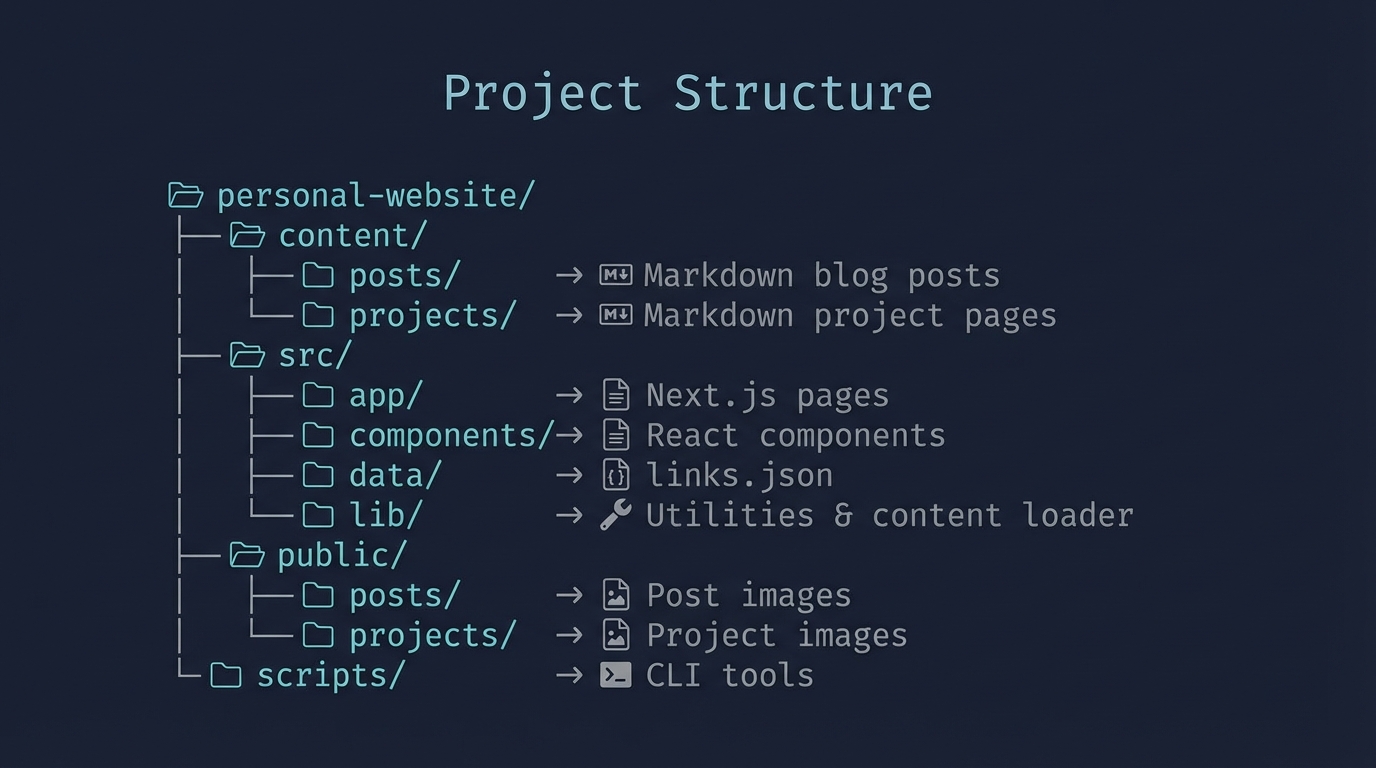
Content as Markdown
Posts and projects are stored as markdown files with YAML frontmatter:
---
id: my-post
title: My Post Title
date: 2025-01-15
source: Blog
---

Post content goes here...
This means I can edit content in any text editor, use git for version control, and preview changes locally before deploying.
CLI Tools for Content Management
Rather than manually creating files, I built CLI scripts to streamline content creation:
npm run add-post "Post Title" --source="Twitter" --url="..."
npm run add-project "Project Name" --description="..." --technologies="React,TypeScript"
npm run add-link "Link Title" "https://url.com" "Category"
npm run list-content  # See everything at a glance
Technical Highlights
- Static Export:
next buildgenerates pure HTML/CSS/JS - no Node.js server needed - Tailwind CSS v4: Using the latest version with the new PostCSS plugin
- gray-matter: Parses YAML frontmatter from markdown files at build time
- Server/Client Split: Data loading in server components, interactivity in client components
- Auto Word Counts: Calculated automatically from markdown content
The Content System Evolution
The site went through a major refactor from JSON-based content storage to markdown files:
Before: Content lived in src/data/posts.json - editing required modifying JSON and hoping you didn't break the syntax.
After: Content lives in content/posts/*.md - edit with any text editor, natural markdown syntax, git-friendly diffs.
This makes adding a new post as simple as creating a markdown file and running npm run deploy.
Deployment
Deploying is a single command:
npm run deployThis runs next build to generate the static site, then uses Wrangler to push to Cloudflare Pages. The whole process takes about 30 seconds.
What's Next
- Image optimization pipeline for project screenshots
- RSS feed for posts
- Search functionality across all content