Close CRM MCP Server
[COMPLETE]A production-grade Model Context Protocol server that enables Claude to read and write CRM data, orchestrate sales workflows, and make intelligent decisions across hundreds of leads in seconds.
In sales, context is everything. Before every call, you need to know: What did we discuss last time? What emails have they sent? Are there open tasks? What stage is the opportunity at?
With a handful of leads, this is manageable. With hundreds? You're spending more time reading than selling.
Enter Model Context Protocol
MCP is a protocol that lets AI assistants like Claude connect to external data sources. Instead of copying and pasting CRM data into a chat, Claude can query the CRM directly.
I built an MCP server that connects Claude Desktop to Close CRM—the CRM I use at work. Now Claude can:
- Pull complete lead histories (emails, calls, notes, meetings, tasks)
- Update lead statuses and custom fields
- Create follow-up tasks and schedule emails
- Generate proposals based on conversation history
- Orchestrate my entire day across dozens of leads
The Architecture
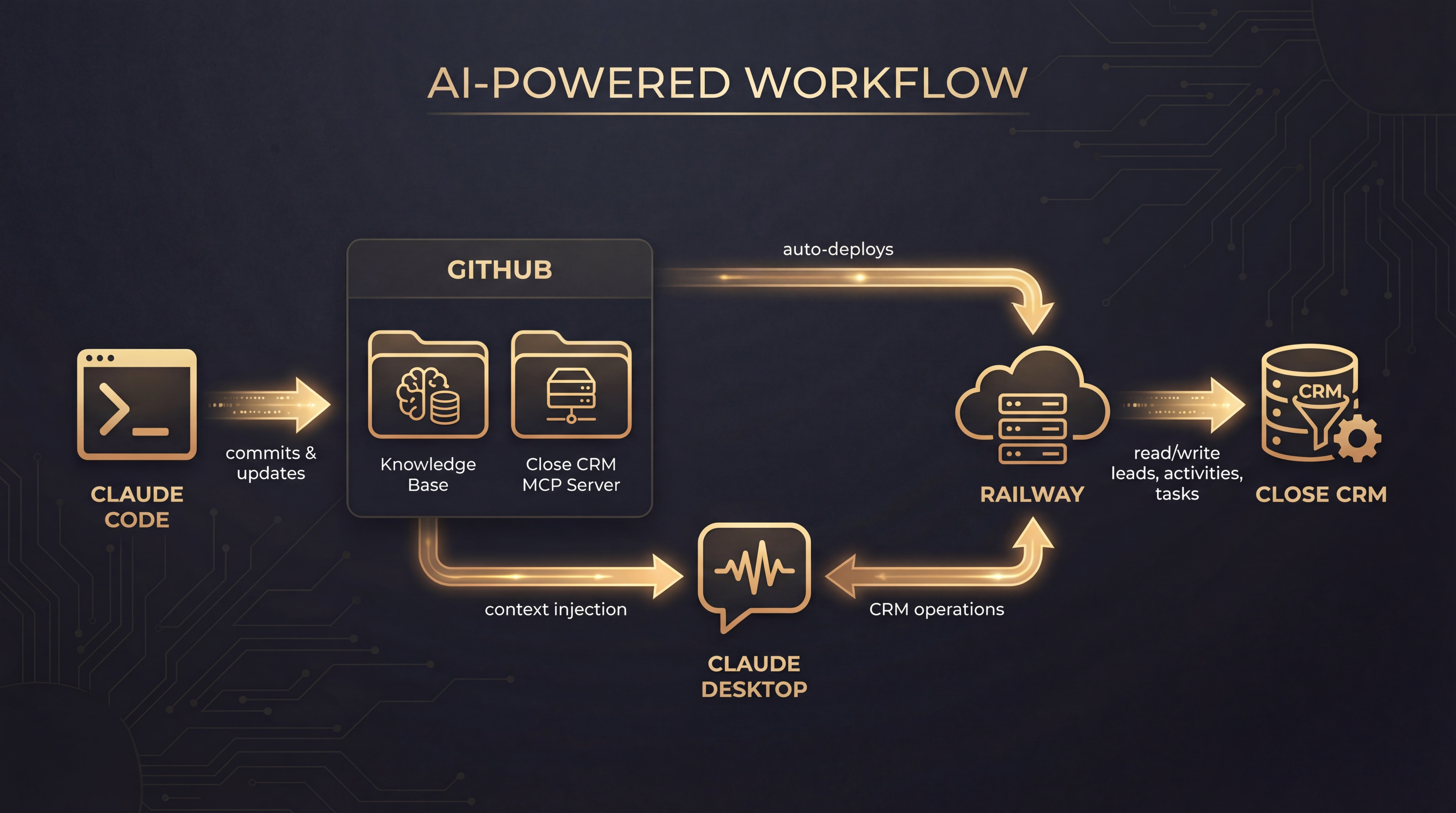
The system has three layers:
- Claude Code manages my knowledge bases and pushes code to GitHub
- Railway auto-deploys the MCP server when I push changes
- Claude Desktop connects to the MCP server and can read/write to Close CRM
This means I can use natural language to interact with my CRM: "What's my highest priority lead today?" or "Draft a follow-up email to Sarah based on our last call."
Consolidation Over Proliferation
The first version had 18 separate tools—one for each CRM operation. It worked, but Claude would often pick the wrong tool or chain them inefficiently.
I consolidated everything into 4 unified tools:
- get_lead_activities - Retrieves all activity types (9+) with intelligent filtering
- update_lead - Handles status changes, custom fields, opportunities, tasks, notes, emails, and SMS in one call
- get_daily_orchestration - Shows meetings + tasks across all leads, grouped by priority
- assess_lead_scope - Checks data volume before loading to prevent context overflow
This consolidation improved Claude's accuracy dramatically. Instead of choosing from 18 options, it picks from 4—and each one is designed to handle complex workflows.
Token Optimization
LLMs charge by the token. Email threads, call transcripts, and lead histories can balloon to hundreds of thousands of tokens—expensive and slow.
I built aggressive optimization into the server:
- Email quote stripping: Removes repeated quoted text from email threads (60-96% reduction)
- Transcript compression: Call transcripts can be simplified, compacted, or summarized (up to 95% reduction)
- Smart truncation: Preserves the most recent and relevant context while trimming old data
The result: I can ingest an entire lead's history—even 100k+ tokens of raw data—into a manageable context window.
Real-World Impact
The practical benefit is time. What used to take 5-10 minutes of reading before each call now takes seconds. Claude summarizes the history, highlights action items, and drafts responses.
For high-volume sales (many leads, shorter cycles), this is a multiplier. For enterprise sales (fewer leads, longer cycles), it becomes a research augmentation and point-of-view generator—but that's a topic for another post.
What I learned: Building for AI consumption is different than building for human consumption. Every byte matters. Every field you include costs tokens. The best MCP tools are opinionated about what data to return and how to structure it.